Monday, 1 July 2019

Composing SLAs across services

Composing SLAs across services

When combining SLAs across different service offerings, the resultant SLA is called a Composite SLA. The resulting composite SLA can provide higher or lower uptime values, depending on your application architecture.

Calculating downtime

Consider an App Service web app that writes to Azure SQL Database. These Azure services currently have the following SLAs:
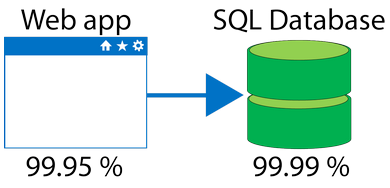
Image representing Web app and its SLA uptime value of 99.95 percent and a SQL database and its SLA value of 99.99 percent.
In this example, if either service fails the whole application will fail. In general, the individual probability values for each service are independent. However, the composite SLA value for this application is:
99.95 percent × 99.99 percent = 99.94 percent
This means the combined probability of failure is higher than the individual SLA values. This isn't surprising, because an application that relies on multiple services has more potential failure points.
Conversely, you can improve the composite SLA by creating independent fallback paths. For example, if SQL Database is unavailable, you can put transactions into a queue for processing at a later time.
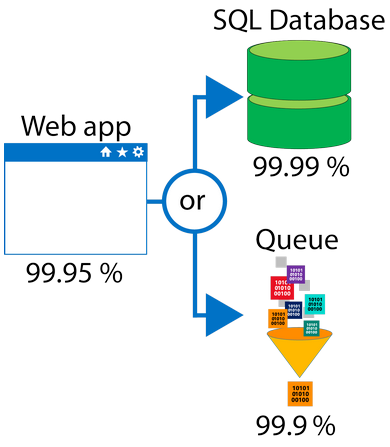
Image representing Web app and its SLA uptime value of 99.95% and SQL database and its SLA value of 99.99%.
With this design, the application is still available even if it can't connect to the database. However, it fails if both the database and the queue fail simultaneously.
If the expected percentage of time for a simultaneous failure is 0.0001 × 0.001, the composite SLA for this combined path of a database or queue would be:
1.0 − (0.0001 × 0.001) = 99.99999 percent
Therefore, if we add the queue to our web app, the total composite SLA is:
99.95 percent × 99.99999 percent = ~99.95 percent
Notice we've improved our SLA behavior. However, there are trade-offs to using this approach: the application logic is more complicated, you are paying more to add the queue support, and there may be data-consistency issues you'll have to deal with due to retry behavior.

Service Level Agreements for Azure

Service Level Agreements for Azure

Microsoft maintains its commitment to providing customers with high-quality products and services by adhering to comprehensive operational policies, standards, and practices. Formal documents called Service-Level Agreements (SLAs) capture the specific terms that define the performance standards that apply to Azure.
  • SLAs describe Microsoft's commitment to providing Azure customers with specific performance standards.
  • There are SLAs for individual Azure products and services.
  • SLAs also specify what happens if a service or product fails to perform to a governing SLA's specification.
 Important
Azure does not provide SLAs for most services under the Free or Shared tiers. Also, free products such as Azure Advisor do not typically have an SLA.

SLAs for Azure products and services

There are three key characteristics of SLAs for Azure products and services:
  1. Performance Targets
  2. Uptime and Connectivity Guarantees
  3. Service credits

Performance Targets

An SLA defines performance targets for an Azure product or service. The performance targets that an SLA defines are specific to each Azure product and service. For example, performance targets for some Azure services are expressed as uptime guarantees or connectivity rates.

Uptime and Connectivity Guarantees

A typical SLA specifies performance-target commitments that range from 99.9 percent ("three nines") to 99.999 percent ("five nines"), for each corresponding Azure product or service. These targets can apply to such performance criteria as uptime or response times for services.
The following table lists the potential cumulative downtime for various SLA levels over different durations:
SLA %Downtime per weekDowntime per monthDowntime per year
991.68 hours7.2 hours3.65 days
99.910.1 minutes43.2 minutes8.76 hours
99.955 minutes21.6 minutes4.38 hours
99.991.01 minutes4.32 minutes52.56 minutes
99.9996 seconds25.9 seconds5.26 minutes
For example, the SLA for the Azure Cosmos DB (Database) service SLA offers 99.999 percent uptime, which includes low-latency commitments of less than 10 milliseconds on DB read operations as well as on DB write operations.

Service Credits

SLAs also describe how Microsoft will respond if an Azure product or service fails to perform to its governing SLA's specification.
For example, customers may have a discount applied to their Azure bill, as compensation for an under-performing Azure product or service. The table below explains this example in more detail.
The first column in the table below shows monthly uptime percentage SLA targets for a single instance Azure Virtual Machine. The second column shows the corresponding service credit amount you receive if the actual uptime is less than the specified SLA target for that month.
MONTHLY UPTIME PERCENTAGESERVICE CREDIT PERCENTAGE
< 99.910
< 9925
< 95100


Region Pairs

Region Pairs

Availability zones are created using one or more datacenters, and there are a minimum of three zones within a single region. However, it's possible that a large enough disaster could cause an outage big enough to affect even two datacenters. That's why Azure also creates region pairs.

What is a region pair?

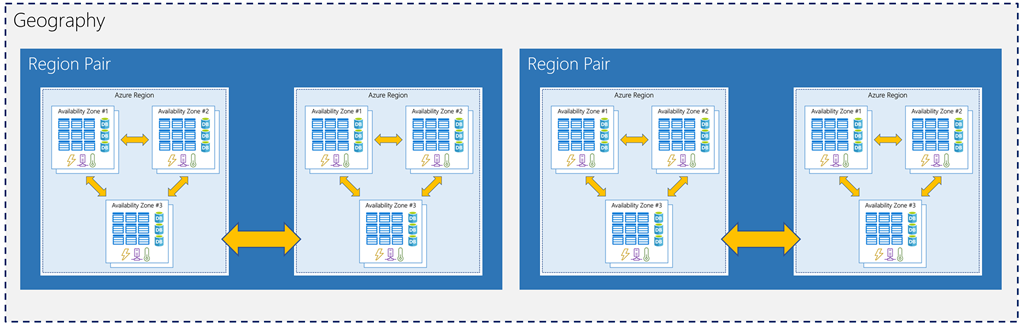
Each Azure region is always paired with another region within the same geography (such as US, Europe, or Asia) at least 300 miles away. This approach allows for the replication of resources (such as virtual machine storage) across a geography that helps reduce the likelihood of interruptions due to events such as natural disasters, civil unrest, power outages, or physical network outages affecting both regions at once.
Examples of region pairs in Azure are West US paired with East US, and SouthEast Asia paired with East Asia.
Image showing the relationship between geography, region pair, region, and datacenter
Since the pair of regions is directly connected and far enough apart to be isolated from regional disasters, you can use them to provide reliable services and data redundancy. Some services offer automatic geo-redundant storage using region pairs.
Additional advantages of region pairs include:
  • If there's an extensive Azure outage, one region out of every pair is prioritized to help reduce the time it takes to restore them for applications.
  • Planned Azure updates are rolled out to paired regions one region at a time to minimize downtime and risk of application outage.
  • Data continues to reside within the same geography as its pair (except for Brazil South) for tax and law enforcement jurisdiction purposes.
Having a broadly distributed set of datacenters allows Azure to provide a high guarantee of availability. Let's explore what that means.

Availability Zones

Availability Zones

You want to ensure your services and data are redundant so you can protect your information in case of failure. When you are hosting your infrastructure, this requires creating duplicate hardware environments. Azure can help make your app highly available through Availability Zones.

What is an Availability Zone?

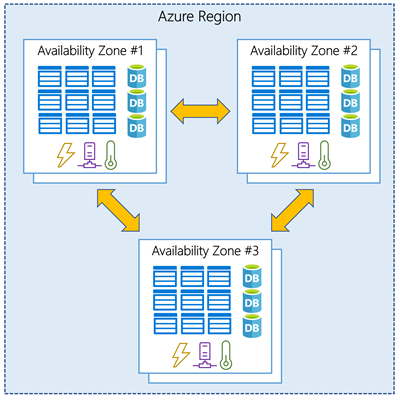
Availability Zones are physically separate datacenters within an Azure region.
Each Availability Zone is made up of one or more datacenters equipped with independent power, cooling, and networking. It is set up to be an isolation boundary. If one zone goes down, the other continues working. Availability Zones are connected through high-speed, private fiber-optic networks.
Image showing three datacenters connected within a single region to represent an Availability Zone

Supported regions

Not every region has support for Availability Zones. The following regions have a minimum of three separate zones to ensure resiliency.
  • Central US
  • East US 2
  • West US 2
  • West Europe
  • France Central
  • North Europe
  • Southeast Asia
 Tip
The list of supported regions is expanding - check the documentation for the latest information.

Using Availability Zones in your apps

You can use Availability Zones to run mission-critical applications and build high-availability into your application architecture by co-locating your compute, storage, networking, and data resources within a zone and replicating in other zones. Keep in mind that there could be a cost to duplicating your services and transferring data between zones.
Availability Zones are primarily for VMs, managed disks, load balancers, and SQL databases. Azure services that support Availability Zones fall into two categories:
  • Zonal services – you pin the resource to a specific zone (for example, virtual machines, managed disks, IP addresses)
  • Zone-redundant services – platform replicates automatically across zones (for example, zone-redundant storage, SQL Database).
Check the documentation to determine which elements of your architecture you can associate with an Availability Zone.

Geographies

Geographies

Azure divides the world into geographies that are defined by geopolitical boundaries or country borders. An Azure geography is a discrete market typically containing two or more regions that preserve data residency and compliance boundaries. This division has several benefits.
  • Geographies allow customers with specific data residency and compliance needs to keep their data and applications close.
  • Geographies ensure that data residency, sovereignty, compliance, and resiliency requirements are honored within geographical boundaries.
  • Geographies are fault-tolerant to withstand complete region failure through their connection to dedicated high-capacity networking infrastructure.
 Tip
Data residency refers to the physical or geographic location of an organization's data or information. It defines the legal or regulatory requirements imposed on data based on the country or region in which it resides and is an important consideration when planning out your application data storage.
Geographies are broken up into the following areas:
  • Americas
  • Europe
  • Asia Pacific
  • Middle East and Africa
Each region belongs to a single geography and has specific service availability, compliance, and data residency/sovereignty rules applied to it. Check the documentation for more information (a link is available in the summary unit).

Datacenters and Regions in Azure

Datacenters and Regions in Azure

Microsoft Azure is made up of datacenters located around the globe. When you leverage a service or create a resource such as a SQL database or virtual machine, you are using physical equipment in one or more of these locations.
The specific datacenters aren't exposed to end users directly; instead, Azure organizes them into regions.

What is a region?

A region is a geographical area on the planet containing at least one, but potentially multiple datacenters that are nearby and networked together with a low-latency network. Azure intelligently assigns and controls the resources within each region to ensure workloads are appropriately balanced.
When you deploy a resource in Azure, you will often need to choose the region where you want your resource deployed.
 Important
Some services or virtual machine features are only available in certain regions, such as specific virtual machine sizes or storage types. There are also some global Azure services that do not require you to select a particular region, such as Microsoft Azure Active Directory, Microsoft Azure Traffic Manager, and Azure DNS.
A few examples of regions are West US, Canada Central, West Europe, Australia East, and Japan West. Here's a view of all the available regions as of December 2018:
Map of available regions as of December 2018

Why is this important?

Azure has more global regions than any other cloud provider. This gives you the flexibility to bring applications closer to your users no matter where they are. It also provides better scalability, redundancy, and preserves data residency for your services.

Special Azure regions

Azure has specialized regions that you might want to use when building out your applications for compliance or legal purposes. These include:
  • US DoD Central, US Gov Virginia, US Gov Iowa and more: These are physical and logical network-isolated instances of Azure for US government agencies and partners. These datacenters are operated by screened US persons and include additional compliance certifications.
  • China East, China North and more: These regions are available through a unique partnership between Microsoft and 21Vianet, whereby Microsoft does not directly maintain the datacenters.
Regions are what you use to identify the location for your resources, but there are two other terms you should also be aware of: geographies and availability zones.

Types of cloud services - IaaS versus SaaS versus PaaS

When talking about cloud computing, there are three major categories. It's important to understand them because they are used in conversation, documentation, and training.

Explore the three categories of cloud computing

IaaS versus SaaS versus PaaS


IaaS icon

Infrastructure as a service (IaaS)

Infrastructure as a Service is the most flexible category of cloud services. It aims to give you complete control over the hardware that runs your application (IT infrastructure servers and virtual machines (VMs), storage, networks, and operating systems). Instead of buying hardware, with IaaS, you rent it. It's an instant computing infrastructure, provisioned and managed over the internet.

 Note
When using IaaS, ensuring that a service is up and running is a shared responsibility: the cloud provider is responsible for ensuring the cloud infrastructure is functioning correctly; the cloud customer is responsible for ensuring the service they are using is configured correctly, is up to date, and is available to their customers. This is referred to as the shared responsibility model.
IaaS is commonly used in the following scenarios:
  • Migrating workloads. Typically, IaaS facilities are managed in a similar way as on-premises infrastructure and provide an easy migration path for moving existing applications to the cloud.
  • Test and development. Teams can quickly set up and dismantle test and development environments, bringing new applications to market faster. IaaS makes scaling development and testing environments, fast and economical.
  • Website hosting. Running websites using IaaS can be less expensive compared to traditional web hosting.
  • Storage, backup, and recovery. Organizations avoid the capital outlay and complexity of storage management, which typically requires skilled staff to manage data and meet legal and compliance requirements. IaaS is useful for managing unpredictable demand and steadily growing storage needs. IaaS can also simplify the planning and management of backup and recovery systems.

PaaS icon

Platform as a service (PaaS)

PaaS provides an environment for building, testing, and deploying software applications. The goal of PaaS is to help you create an application quickly without managing the underlying infrastructure. For example, when deploying a web application using PaaS, you don't have to install an operating system, web server, or even system updates.

PaaS is a complete development and deployment environment in the cloud, with resources that enable organizations to deliver everything from simple cloud-based apps to sophisticated cloud-enabled enterprise applications. Resources are purchased from a cloud service provider on a pay-as-you-go basis and accessed over a secure Internet connection.
PaaS is commonly used in the following scenarios:
  • Development framework. PaaS provides a framework that developers can build upon to develop or customize cloud-based applications. Just like Microsoft Excel macro, PaaS lets developers create applications using built-in software components. Cloud features such as scalability, high-availability, and multi-tenant capability are included, reducing the amount of coding that developers must do.
  • Analytics or business intelligence. Tools provided as a service with PaaS allow organizations to analyze and mine their data. They can find insights and patterns, and predict outcomes to improve business decisions such as forecasting, product design, and investment returns.

SaaS icon

Software as a service (SaaS)

SaaS is software that is centrally hosted and managed for the end customer. It is usually based on an architecture where one version of the application is used for all customers, and licensed through a monthly or annual subscription. Office 365, Skype, and Dynamics CRM Online are perfect examples of SaaS software.

Cost and Ownership

IaaSPaaSSaaS
Upfront costsThere are no upfront costs. Users pay only for what they consume.There are no upfront costs. Users pay only for what they consume.Users have no upfront costs; they pay a subscription, typically on a monthly or annual basis.
User ownershipThe user is responsible for the purchase, installation, configuration, and management of their own software, operating systems, middleware, and applications.The user is responsible for the development of their own applications. However, they are not responsible for managing the server or infrastructure. This allows the user to focus on the application or workload they want to run.Users just use the application software; they are not responsible for any maintenance or management of that software.
Cloud provider ownershipThe cloud provider is responsible for ensuring that the underlying cloud infrastructure (such as virtual machines, storage, and networking) is available for the user.The cloud provider is responsible for operating system management, network, and service configuration. Cloud providers are typically responsible for everything apart from the application that a user wants to run. They provide a complete managed platform on which to run the application.The cloud provider is responsible for the provision, management, and maintenance of the application software.

Management responsibilities

One thing to understand is that these categories are layers on top of each other. For example, PaaS adds a layer on top of IaaS by providing a level of abstraction. The abstraction has the benefit of hiding the details that you may not care about, so that you can get to coding quicker. However, one aspect of the abstraction is that you have less control over the underlying hardware. The following illustration shows a list of resources that you manage and that your service provider manages in each cloud service category.
An illustration showing the level of abstraction in each category of cloud service.
  • IaaS requires the most user management of all the cloud services. The user is responsible for managing the operating systems, data, and applications.
  • PaaS requires less user management. The cloud provider manages the operating systems, and the user is responsible for the applications and data they run and store.
  • SaaS requires the least amount of management. The cloud provider is responsible for managing everything, and the end user just uses the software.

Summary

IaaS, PaaS, and SaaS each contain different levels of managed services. You may easily use a combination of these types of infrastructure. You could use Office 365 on your company’s computers (SaaS), and in Azure, you could host your VMs (IaaS) and use Azure SQL Database (PaaS) to store your data. With the cloud’s flexibility, you can use any combination that provides you with the maximum result.